Installation Chat: All About the 12-Volt Trigger
[18:56] Customer: How long is the trigger cable that is included with the 125HT
[18:57] Rick: the trigger is about 5 inches long. you will need your own wire to splice between the projector and screen.
[18:58] Customer: Okay. I ran Cat5. I have Optoma HD23 that has 12V out. Was trying to figure out what connections I need to get to connect between screen and projector
[18:59] Rick: if you are using your own rj45 you will need pin 7 and 8 and splice to a mono jack.
[19:01] Customer: Thanks. I use that on the projector end. Do I just need RJ45 male for screen?
[19:01] Rick: yes,
[19:02] Customer: THANKS! By the way, is there a setting on the screen motor to stop at a certain height, or is it all up or all down with trigger?
[19:02] Rick: one moment.
[19:03] Rick: https://elitescreens.com/images/download/material/Service/vmax2_spectrum_limit_adjustments.pdf
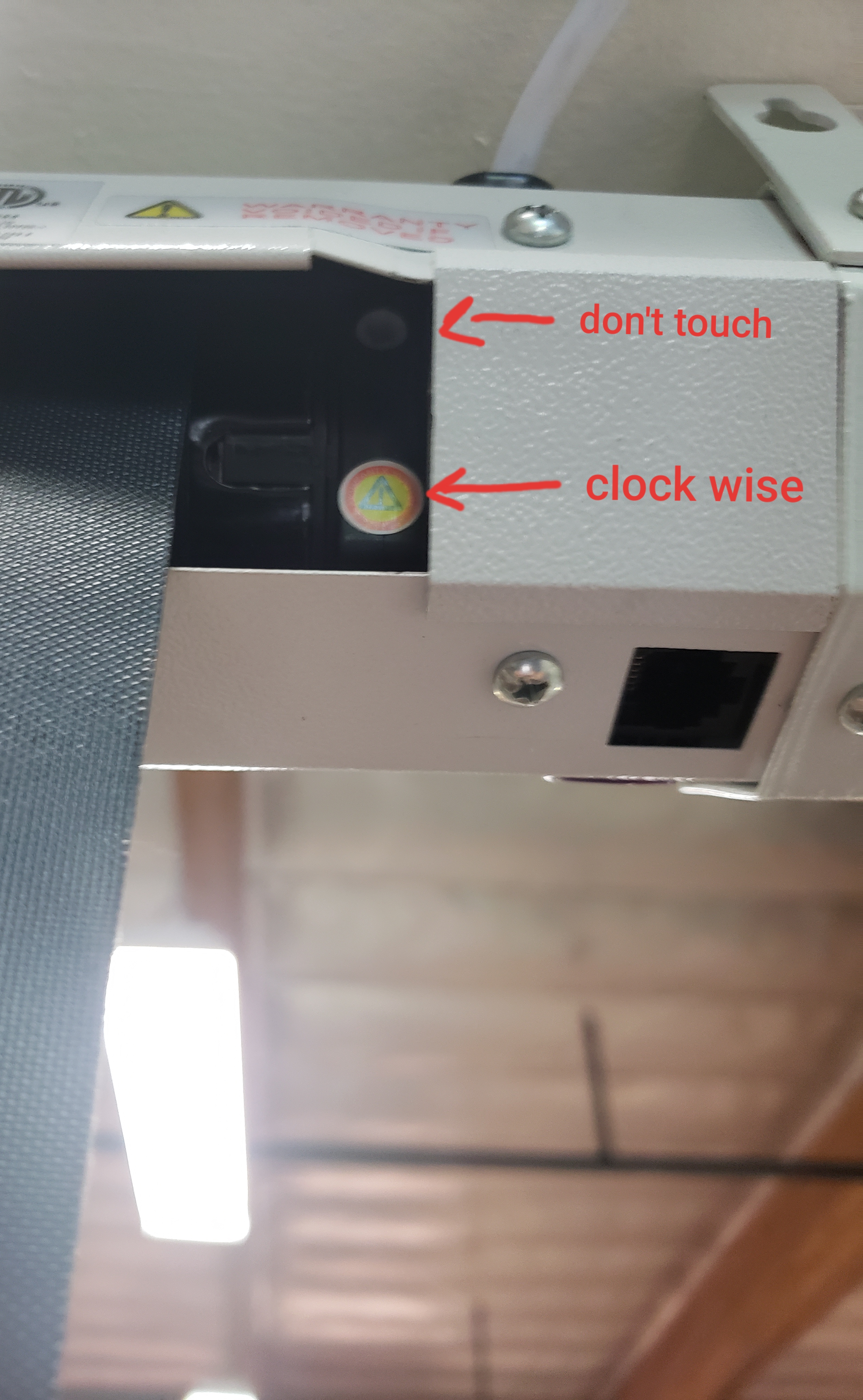
[19:03] Rick: File : https://tawk.link/598aa11bdbb01a218b4db711/a/579b82be0995142b0d81b97f/cc06f430f4b9d4daa0b5665799fff94856e5e0d6/20191002_092417.jpg
[19:04] Rick: here is a photo of one of our screens.
[19:05] Customer: Sweet. Thanks. In the comparison chart on https://elitescreens.com/images/download/material/userguides/ElectricScreen_Accessories.pdf it shows “Wall box with RJ45 port” included as accessory. What is that?
[19:06] Rick: its a 3 way switch that will plug in to the screen if you don’t want to use the remote. but this is an accessory.
[19:07] Customer: Okay. Does the RJ45 connect to the remote, or directly to the screen? Is there a schematic?
[19:08] Rick: the wired remote plug in to the screen.
[19:08] Rick: on the photo i provided your can see the location.
[19:08] Rick: you can see the location*
[19:10] Rick: https://elitescreens.com/images/download/material/userguides/user_guide_Spectrum_Tension2.pdf
[19:10] Customer: Is the black square on the underside the RJ45 port?
[19:10] Rick: yes,
[19:10] Rick: it is located on the left hand side when you are facing the front of the screen.
[19:12] Customer: Awesome. So I will have RJ45 directly into back of screen on left hand side, connect to RJ45 / mono jack for projector.
[19:12] Rick: correct.
[19:12] Customer: THANK YOU! Ordering 125HT in a few days!
[19:13] Rick: https://elitescreens.com/elitetube/ZSP-12V_trigger_setup_instructions.mp4
[19:13] Rick: you’re welcome.
[19:14] Customer: My Optoma HD23 is 6 yrs old. Will the awesomeness of the screen reveal the age of my projector and force me to upgrade to a 4K projector….?
[19:16] Rick: the screen will provide the surface needed for your projector to get a clear crisp picture. but it will also work with the newer projector as well.
[19:17] Customer: Thanks for all your help!
[19:17] Rick: you’re welcome.
*The discussion below is based on actual chat transcripts with the omission of any personal/confidential material to protect the customer’s privacy. An example in this case is to change the contact’s identification name/number to “Customer” or a generic name.
Related Products / Categories
Need Assistance?
Contact us for general sales questions, warranty support, technical assistance or providing feedback.